Storage for shared files
On this page
Everything in a Shared Folder is stored on its Relay Server. On a self-hosted server, all of it goes in the storage you provide. On a Relay-hosted server, Markdown notes and Canvases don't count toward the server's storage, so they sync on every plan, including Free. Bases, images, audio, video, PDFs, and other files need storage from a paid plan, which only the server's owner can buy.
Why the server stores your files
The Relay Server keeps a copy of each shared file so collaborators can receive it when your device is offline.
For how devices exchange updates through the server, see How Relay connects your devices.
Which files count toward storage
| Files | Count toward Relay-hosted storage |
|---|---|
Markdown notes (.md) and Canvases (.canvas) |
No |
Bases (.base), images, audio, video, and PDFs |
Yes |
Other files, such as .html, .txt, .csv, and .json |
Yes |
Which file types sync is set separately for each Shared Folder on each device. Storage unlocks the settings for files that count toward it, and the settings for images, PDFs, audio, video, and Bases are already on. Other files stays off until you turn it on for the folder on each device. For the steps and every extension, see Sync non-Markdown files.
Self-hosted storage
You can self-host a Relay Server with S3-compatible storage on your own infrastructure. Self-hosting is free on every Relay plan. You provide and manage the server and storage for your shared notes, Canvases, and files. This is bring-your-own storage: you don't pay Relay for it.
For deployment instructions, use the Relay Server template. For the broader choice of where to run Relay, see Choose how to host Relay.
Relay-hosted storage
If you prefer convenience, Relay can host the server and storage for you. Only the server's owner can upgrade its plan; if you joined someone else's server, ask its owner. To choose a plan, see plans and storage allowances, then upgrade your Relay Server.
Settings without storage
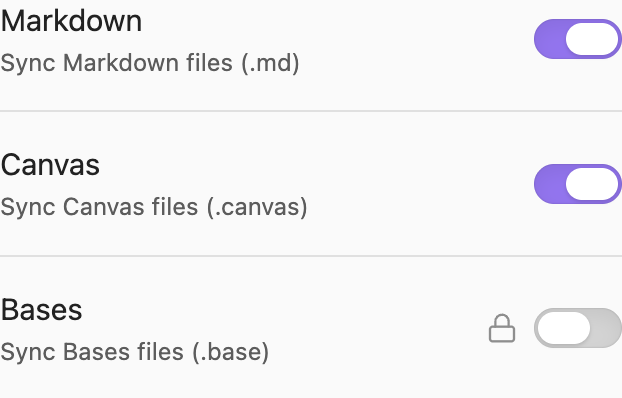
When a Shared Folder's Relay Server has no storage, the folder's file-type settings that need storage are locked. To see them, open Relay settings, select the folder under My vault, and scroll to Sync settings for this device. A Buy storage button appears below the locked settings. Notes and Canvases keep syncing, because they don't count toward storage.
Files inside the Shared Folder
A note or Canvas can link to a file elsewhere in your vault, but only files inside the Shared Folder sync. To have Obsidian save new attachments there, see Save attachments next to your notes.